PrinceXML alternative: print HTML in a real browser
Updated by Cyril Nicodème
If your HTML was written for a browser, with a chart, data it fetches or a script that measures the page, print it in a browser. PDFShift runs Chromium for you, one POST per document. We sent the same page to Prince 17, the current version, and it couldn't run fetch(), measure a box or load Chart.js. PDFShift did all three.
Prince 17 and PDFShift on the same two pages
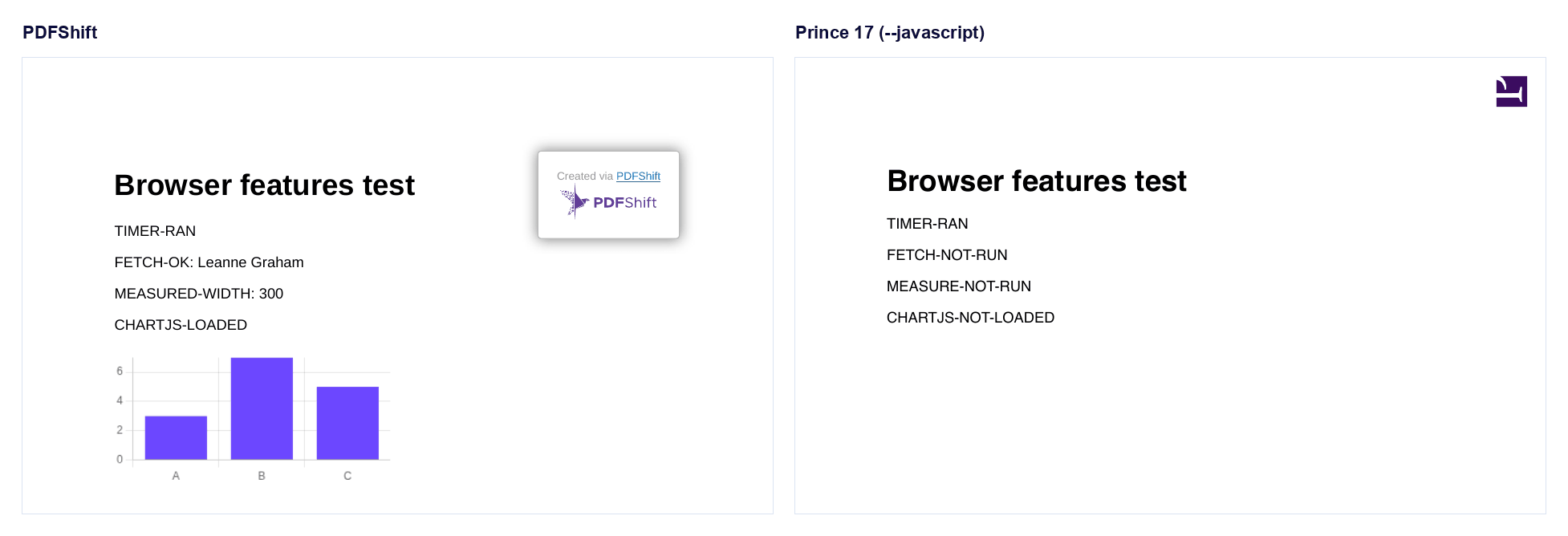
On November 18, 2026, we ran two test pages through Prince 17 with its free non-commercial licence, and through PDFShift's free mode. The first tested what a browser gives a page, one script action per row:
| What the script did | PDFShift | Prince 17 with --javascript |
|---|---|---|
| Changed text after a 300 ms timer | Ran | Ran |
Loaded a JSON record with fetch() | Ran: "FETCH-OK: Leanne Graham" | Didn't run |
Read a box's width with getBoundingClientRect() | Ran: 300 | Didn't run |
| Drew a bar chart with Chart.js 4.4.6 | Drew it | Script didn't load, canvas left blank |
Prince printed these errors:
prince: chart.umd.min.js: error: ReferenceError: no such property: WeakMap
prince: test2.html:18: error: ReferenceError: no such property: fetch
prince: test2.html:19: error: TypeError: 'getBoundingClientRect': undefined is not a function
The second page was plainer: a CSS grid, a flexbox row with gaps, a CSS variable, a print stylesheet, an @page footer with "Page 1 of 1" and a short modern script. Both printed all of it, Prince once we turned on --javascript. On DocRaptor, which still defaults to Prince 15.1, the same grid stacked into one column.
Prince runs JavaScript, but not the way a browser does
Prince runs your scripts before it lays out the page, so a script can't measure anything yet. It can run a second time after layout to inspect the result, and Prince.registerPostLayoutFunc lays the page out again if that changes anything.
So with Prince, do that work before you send the page: fetch the data and put it in the HTML, draw charts as SVG yourself, and write scripts for Prince, not for a browser. On PDFShift, the page runs as it does in Chrome. If a script needs time to finish, wait_for holds the PDF until a function you name returns true, or delay waits a fixed time.
What Prince costs for commercial use
For a business, Prince sells a site licence: any number of your own servers, with upgrades and support, priced by quote. Prince says those "start around USD $2000 per year for startups". You still run the servers.
PDFShift is priced per document, and we run the servers. The free plan gives 50 credits a month with no card, and paid plans start at $9 for 500. One credit covers a PDF up to 5 MB. A year of 50,000 PDFs a month costs $1,490, and 100,000 a month costs $2,490. See all plans.
Moving a Prince command to a PDFShift request
A typical server call to Prince reads a file and writes a PDF:
# Prince: https://www.princexml.com/doc/command-line/
prince --javascript --baseurl=https://example.com/ invoice.html -o invoice.pdf
The same job on PDFShift is one request to our convert endpoint:
curl https://api.pdfshift.io/v3/convert/pdf \
  -H "X-API-Key: $PDFSHIFT_API_KEY" \
  -H "Content-Type: application/json" \
  -d '{"source": "https://example.com/invoice.html", "use_print": true}' \
  -o invoice.pdf
| PDFShift | Replaces this in Prince |
|---|---|
source: your HTML or a URL | The input file |
Scripts run by default. disable_javascript: true turns them off | --javascript, off by default |
use_print: true, or PDFShift uses your screen CSS | Print media, Prince's default |
Send a URL as source, or use absolute URLs in your HTML | --baseurl for relative files |
format and margin. @page margin boxes still print | @page size and margins |
header and footer, with {{page}} and {{total}} | Running headers and page counters |
sandbox: true for free test PDFs with a watermark | The free licence's watermark |
| An API key, no licence file | A licence file on every server |
Before you move a template, search it for prince- properties, position: running(), float: footnote, string-set, target-counter() and leader(): those are Prince features, and Chromium doesn't read them. To see a template at A4 with its print CSS first, paste it into our HTML viewer. Then create a free account and send it.
Other PrinceXML alternatives
Prince as a hosted API: DocRaptor and EuroPDF run Prince for you.
Hosted APIs on Chromium, like PDFShift: Api2Pdf, PDFBolt and CustomJS. Browserless hosts browsers for your own Puppeteer or Playwright code.
Engines you run yourself: WeasyPrint and PDFreactor have their own layout engines, and wkhtmltopdf's repository has been archived since January 2023. Puppeteer and Playwright drive Chromium on your server (our Puppeteer alternatives page covers them), and Gotenberg puts Chromium in a Docker container.
Frequently asked questions
Is Prince free?
Only for non-commercial use, and Prince's licence doesn't count invoices or receipts as non-commercial. The free version puts a watermark on its PDFs, and if you generate documents routinely, the page people download them from needs a link to princexml.com.
Does Prince support CSS grid?
Yes, since Prince 16 (February 2025) on a single page, and since Prince 17 (September 2026) across pages too. None of DocRaptor's pipelines runs Prince 16 or 17.
Got a Prince template full of running headers or footnotes?
Send us the HTML and we'll look.