Gotenberg alternative: HTML to PDF without the container
Updated by Cyril Nicodème
Gotenberg's own docs tell you to keep it behind your firewall, because out of the box it asks for no credentials and loads whatever it's sent. That's the first of several jobs that come with a free container. We take them all off your hands. You send one POST with your HTML or a URL. Chromium renders it and the PDF comes back.
What Gotenberg's docs ask you to run
A private network, or a login and HTTPS
When only your backend calls Gotenberg, its docs say to keep it off the public network. When other services share that network, you turn on authentication (basic auth or OIDC) and serve HTTPS. When requests carry what your users wrote, such as a URL to print, you also restrict outbound requests and limit resources. That's the setup you'd build before a no-code tool or an AI agent could call it.
PDFShift is a public API from the start. Every request carries your key in the X-API-Key header, and agents reach it through our hosted MCP server or our OpenAPI spec.
A queue size
One container runs Chromium on up to six pages at once (--chromium-max-concurrency). Requests past that wait in a queue with no limit until you set one with --chromium-max-queue-size. Once you do, the next request after the cap gets a 429. Choosing that number means choosing between waiting and failing. On PDFShift there's no queue for you to size.
A 30-second clock
--api-timeout stops each request at 30 seconds by default, and time spent in the queue counts. A request past it gets a 503, so on a busy minute a slow page becomes an error. PDFShift allows 30 seconds on the free plan, and paid plans can go up to 15 minutes on request.
Memory, restarts and a 640 MB image
Gotenberg's install guide asks for at least 1 GiB of memory on Cloud Run, and at least 512Mi and 0.2 CPU on Kubernetes. The full image is about 640 MB compressed for linux/amd64, and inside it Chromium restarts every 100 conversions to keep its memory in check (--chromium-restart-after, and 0 turns it off). On PDFShift, there's no image to pull, no memory to size, and you never run the browser.
Releases
Gotenberg ships often: four releases came out between November 10 and November 14, 2026. Each one is yours to pull, test against your templates and roll out. On PDFShift, we run the Chromium upgrades. New accounts get the latest version, and an X-Processor-Version header lets you pin one.
That's the whole idea behind PDFShift: people don't buy PDFs, they buy not having to run Chromium.
Moving your Gotenberg request to PDFShift
This map covers Gotenberg's Chromium routes for HTML and URLs, not its LibreOffice route for Office files or its PDF routes (merge, split, PDF/A).
Here's a typical Gotenberg call: an invoice page, its style sheet, a footer with page numbers, A4 paper, a 1-inch bottom margin and a 2-second wait.
# Gotenberg: https://gotenberg.dev/docs/chromium/convert-html
curl --request POST http://localhost:3000/forms/chromium/convert/html \
  --form [email protected] \
  --form [email protected] \
  --form [email protected] \
  --form paperSize=A4 \
  --form marginBottom=1in \
  --form waitDelay=2s \
  -o invoice.pdf
The same PDF from PDFShift is one JSON body. The style sheet goes inside a <style> tag, and the footer is an object with page variables:
# PDFShift: https://docs.pdfshift.io/api-reference/convert-to-pdf
curl --request POST https://api.pdfshift.io/v3/convert/pdf \
  -H "X-API-Key: $PDFSHIFT_API_KEY" \
  -H "Content-Type: application/json" \
  -o invoice.pdf \
  -d '{
    "source": "<html>...your index.html, with style.css in a <style> tag...</html>",
    "format": "A4",
    "margin": {"bottom": "1in"},
    "delay": 2000,
    "footer": {
      "source": "<div style=\"font-size:10px\">Page {{page}} of {{total}}</div>",
      "height": "48"
    }
  }'
These are the fields that change your PDF when you port:
| PDFShift | Gotenberg | |
|---|---|---|
| Linked files (style.css, logo.png) | One source string, so a relative link has nothing to load from. Put CSS in a <style> tag, use absolute URLs or a <base href>, or send the page's URL as source | Uploaded next to index.html and linked by name alone |
| Paper | A4 unless you set format | Letter unless you set paperSize |
| Margins | None unless you set margin | 0.39in on each side |
| Backgrounds | Printed. disable_backgrounds: true drops background images | printBackground is false, which drops the html and body background. Element backgrounds still print |
| Waiting for the network | Waits until no request has run for 500 ms (wait_for_network) | Doesn't wait (skipNetworkIdleEvent is true) |
| Waiting for your script | wait_for: the name of a global function, up to 30 s | waitForExpression: an expression such as window.ready === true |
| A fixed wait | delay in milliseconds, up to 10,000 | waitDelay as a duration, such as 2s |
| Header and footer | header and footer objects with source and height, and {{page}}, {{total}}, {{date}}, {{title}}, {{url}} | header.html and footer.html files, with the classes pageNumber, totalPages, date, title, url |
| Webhook | One webhook parameter | Two headers: Gotenberg-Webhook-Url and Gotenberg-Webhook-Events-Url |
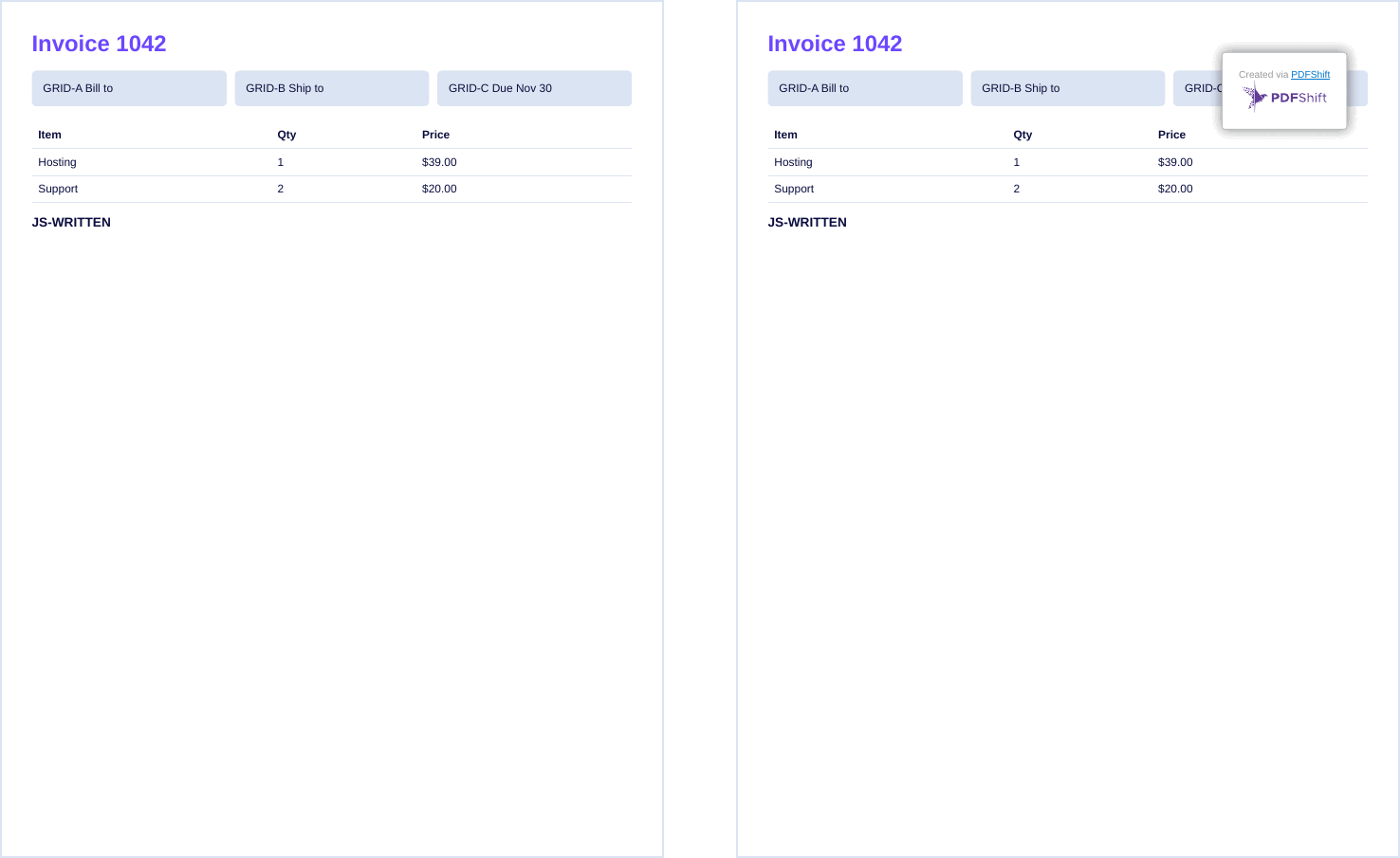
We ran this port on November 14, 2026, with an invoice that links a style.css and has a three-column grid, a table and a short script. Gotenberg's public demo got index.html and style.css. PDFShift got the same HTML with the CSS in a <style> tag, format: "Letter" and margin: "0.39in". The PDFs matched: same grid, same table, and the script's line printed.
What running Gotenberg costs, next to PDFShift's plans
Gotenberg is free. The server isn't. We priced one always-on instance on Google Cloud Run from Google's price list (Iowa, instance-based billing, 730 hours, after Google's free tier). It's $47.34 a month at Gotenberg's 1 GiB floor with 1 vCPU, or $52.60 with 2 GiB. The 1 vCPU is our pick: Gotenberg's docs name only the memory. A second instance, so a restart or a deploy doesn't stop your PDFs, brings it to $99.90 to $110.41, and Google's free tier only applies once per billing account.
| PDFs a month | PDFShift | One Gotenberg instance | Two Gotenberg instances |
|---|---|---|---|
| 500 | $9 (Starter) | $47.34 to $52.60 | $99.90 to $110.41 |
| 5,000 | $39 (Growth) | $47.34 to $52.60 | $99.90 to $110.41 |
| 25,000 | $99 (Business) | $47.34 to $52.60 | $99.90 to $110.41 |
| 50,000 | $149 (Shift 50k) | $47.34 to $52.60 | $99.90 to $110.41 |
That bill is a floor you pay before the first PDF. Past six pages at once, Gotenberg's docs say to run more containers behind a load balancer, and each one adds an instance. The bill also leaves out egress, logs, and the hours someone spends on the jobs above. On PDFShift, one credit covers a PDF up to 5 MB, and every plan is on our pricing page.
Other Gotenberg alternatives, by what replaces the container
- A hosted HTML-to-PDF API, with no server to run. PDFShift, on Chromium. DocRaptor, which runs the Prince engine instead. Api2Pdf, with Chrome, wkhtmltopdf and LibreOffice endpoints for $1 a month plus bandwidth and compute. PDF.co, with HTML, URL and template endpoints from $8.99 a month billed yearly. PDFBolt, free for 50 documents a month, then $19 for 2,000. Nutrient's DWS Processor API, which takes an HTML file, with 50 free credits a month (watermarked) and $75 a month for 1,000 credits. sed.sh, at $0.005 a report after a $10 deposit.
- Hosted browsers your code drives. Browserless, free for 1,000 units a month, where a unit is up to 30 seconds of browser time.
- A library inside your app. Puppeteer or Playwright in your own service. IronPDF for .NET, $999 for one developer with a perpetual license. UniPDF with UniHTML, a commercial Go library. WeasyPrint, free and open source. Oicana, which typesets Typst templates inside your app.
- Template-first generators, where you design a document and send JSON. PDFMonkey, which renders in a Chrome-based browser: 20 documents a month free, then from €5 for 300. APITemplate.io, which also takes raw HTML or a URL: 50 free a month, then from $19 for 3,000. Carbone, in their cloud or self-hosted, with a free Community Edition. DocSpring, with 200 free credits a month, then from $49.
Frequently asked questions
Can I send PDFShift a URL instead of HTML?
Yes. The source parameter takes either one. Send a URL and PDFShift loads the page from your server, with its style sheets, images and fonts, the way a browser does. That's often the quickest port for a template that links many files.
Can AI agents and no-code tools call PDFShift?
Yes. Claude, Cursor and other MCP clients connect to our hosted MCP server with your API key. n8n has a verified PDFShift community node, and tools like Lovable, Bubble and Make send the same POST you'd send from your own code.
Does PDFShift keep my documents?
Not by default. The PDF comes back in the response and isn't stored. If you send filename or webhook, we keep the PDF on S3 for 2 days so you can fetch it from the URL we return.
How do I test my templates before switching?
Send sandbox: true with your API key. Sandbox PDFs carry a watermark, use no credits, and you can make up to 10 a minute. To check the HTML itself first, paste it into our free HTML viewer.
Get a free API key: 50 credits a month, no card.
Switched a Gotenberg request to PDFShift and the PDF looks wrong?
Drop us a line.