Cloudflare Browser Rendering alternative for PDFs
Updated by Cyril Nicodème
Keep your Worker and hand the PDF to us. Your Worker sends the HTML in one fetch and gets the PDF back, and that same request can add a password or a watermark, put a copy in your S3 bucket, or run in HIPAA mode. Cloudflare Browser Run, the new name for Browser Rendering, doesn't list any of those in its /pdf docs.
What goes in a PDFShift request that /pdf doesn't list
| PDFShift | Browser Run /pdf | |
|---|---|---|
| Password and permissions | protection: user and owner passwords, no print, no copy, no modify | Not listed on the /pdf docs (November 2026) |
| Watermark | watermark, as text or an image | Not listed on the /pdf docs |
| Where the PDF goes | In the response, to your S3 bucket (s3_destination), or to a webhook | In the response. Cloudflare doesn't keep it beyond a short cache, 5 seconds by default |
| HIPAA | is_hipaa: true, with a BAA | Not listed on the Browser Run docs |
| Chrome version | Pin one with the X-Processor-Version header | Chrome 152 in our test. The user agent changes when Cloudflare updates Chrome, and no pin is documented |
| Where it runs | OVH in Gravelines and Strasbourg, France | Cloudflare's global network, with no region named on the Browser Run docs |
Calling PDFShift from a Worker
Swap the env.BROWSER call for a fetch to PDFShift:
// A Cloudflare Worker that makes the invoice PDF with PDFShift instead of env.BROWSER.
// Set the key once with: npx wrangler secret put PDFSHIFT_API_KEY
export default {
  async fetch(request, env) {
    const html = await request.text();
    const res = await fetch("https://api.pdfshift.io/v3/convert/pdf", {
      method: "POST",
      headers: {
        "X-API-Key": env.PDFSHIFT_API_KEY,
        "Content-Type": "application/json",
      },
      body: JSON.stringify({
        source: html,
        format: "A4",
        use_print: true,
        margin: { top: "0px", bottom: "0px", left: "30px", right: "30px" },
        header: {
          source: '<div style="font-size:10px;text-align:center">Company Name | {{date}} | {{title}}</div>',
          height: "100px",
        },
        footer: {
          source: '<div style="font-size:10px;text-align:center">Page {{page}} of {{total}}</div>',
          height: "80px",
        },
      }),
    });
    if (!res.ok) {
      return new Response(await res.text(), { status: res.status });
    }
    return new Response(res.body, { headers: { "Content-Type": "application/pdf" } });
  },
};
We ran this handler under Node 26 with its built-in fetch, and it returned our 3-page invoice. The API reference lists every parameter.
Same invoice, same pages, different bills
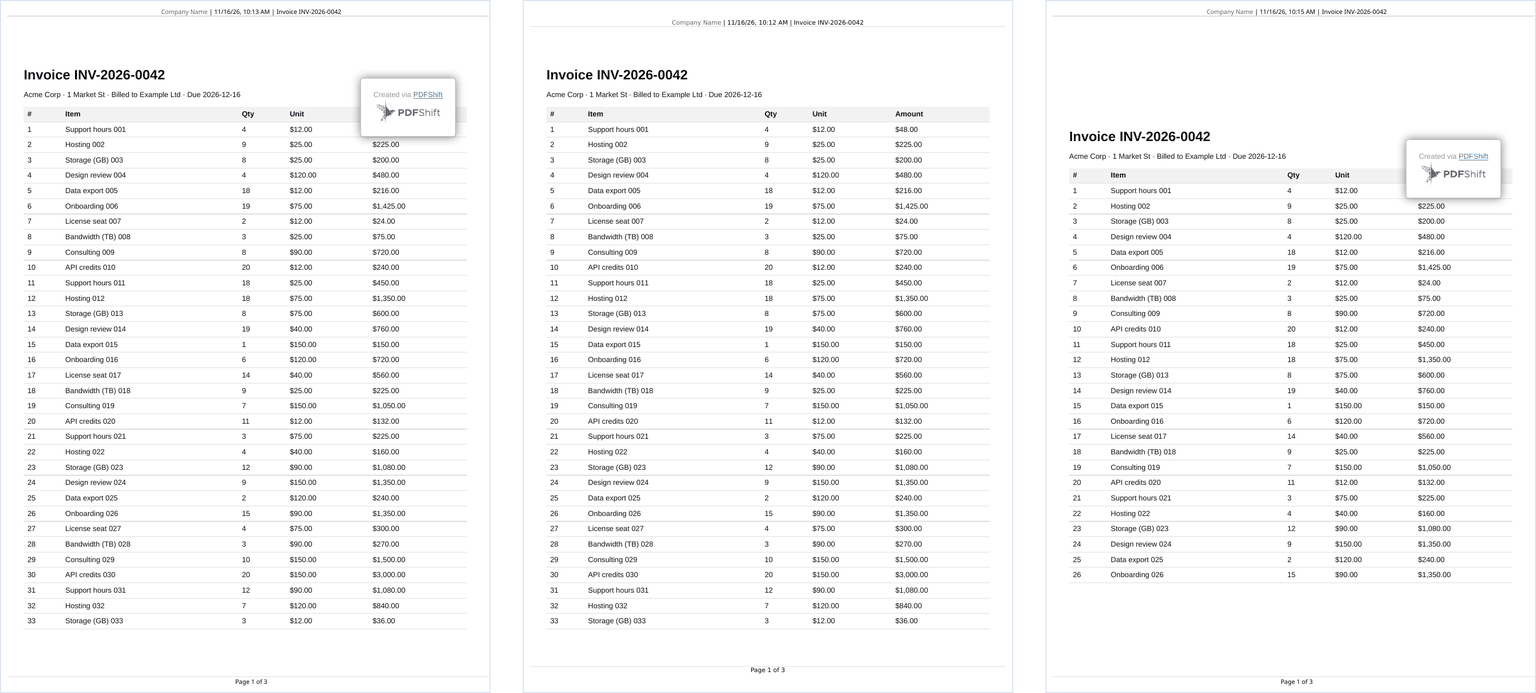
On November 16, 2026, we took the header-and-footer example from Cloudflare's /pdf docs and swapped its URL for a 75-row invoice. We sent the same invoice, header, footer and A4 size to PDFShift. Both PDFs came back with 3 pages, the same 33 rows on page 1, and the header and "Page N of 3" on every page.
We charge per document, not per second: one credit covers a PDF up to 5 MB, 50 a month are free, and paid plans start at $9 for 500 (all plans are on our pricing page).
Browser Run charges for browser time. Over five renders it reported 204 to 412 ms, 245 ms at the median. At Cloudflare's list prices, that's about 147,000 renders of this invoice inside the 10 browser hours Workers Paid includes for its $5 monthly minimum, then $0.09 an hour, or about $0.006 per 1,000 renders. A page that loads web fonts, images or a whole URL keeps the browser open longer, and each response's X-Browser-Ms-Used header gives your own number.
Headers, footers and margins when you port
| Browser Run /pdf | PDFShift |
|---|---|
url or html | source, which takes either |
pdfOptions.format | format |
pdfOptions.margin | margin |
headerTemplate, footerTemplate with the classes date, title, pageNumber, totalPages | header and footer objects with source and height, and {{date}}, {{title}}, {{page}}, {{total}} |
gotoOptions.waitUntil: "networkidle0" | wait_for_network, on by default |
waitForSelector | wait_for, which takes the name of a global function, not a CSS selector |
addStyleTag | css |
On PDFShift, the header and footer heights add to the margins. Copy Cloudflare's 100 px top and 80 px bottom margins along with the header and footer, and you get the blank band in the right-hand page above. Set the top and bottom margins to 0 and put those numbers in the header and footer heights instead.
Other Cloudflare Browser Rendering alternatives
Hosted browsers you control with Puppeteer or Playwright: Browserless, Apify and Playwright Cloud. Hosted HTML-to-PDF APIs: DocRaptor, PDFCrowd, Api2Pdf and PDFMonkey. Running Chromium yourself: Puppeteer or Gotenberg. We compare PDFShift with DocRaptor, PDFMonkey, Puppeteer and Gotenberg on their own pages.
Frequently asked questions
Is Cloudflare Browser Rendering free?
Yes, on Workers Free, within 10 minutes of browser time a day. That's about 2,400 renders of our 3-page test invoice. Past that you get a 429 until the next UTC day.
What are Cloudflare Browser Rendering's limits?
Workers Free allows one /pdf request every 10 seconds, Workers Paid 30 a second. The page load waits 30 seconds by default, 60 at most, and the PDF step 30 seconds by default, 5 minutes at most.
Get a free API key: 50 credits a month, no card.
Switched from Browser Run /pdf to PDFShift and the PDF looks different?
Send us the HTML and we'll look.