Type the address, pick the page size and convert. Our Chromium opens the page and sends the PDF back. If the site's menus and buttons come along, tick Print stylesheet and convert again: most sites hide them on paper. Once it looks right, the API call tab has the same request, ready for your code.
When the PDF has to come from a server
Ctrl+P and Save as PDF handle the page in front of you. They don't handle the invoice your app sends at 3 a.m., the report a customer downloads, or a hundred URLs nobody wants to print by hand. Those need a browser on a server, and that's what you're using here: you send an address, our Chromium prints it, you get a file back. People don't buy PDFs. They buy not having to run Chromium.
Why the PDF doesn't look like the page
PDFShift loads the address from our servers as a first-time visitor, then prints it.
- Menus and buttons in the PDF. That's the screen version, which PDFShift prints by default.
use_print(Print stylesheet above) switches to the styles the site wrote for paper. If you write those styles yourself, the HTML viewer shows what they change before you convert. - Images missing further down. Many pages only load an image when you scroll near it.
lazy_load_imagesscrolls to the bottom first, so they're all there when it prints. - Content that loads late. PDFShift waits until no request has gone out for 500 ms before printing. A chart that draws after that can still be missed. In the API,
delaymakes PDFShift wait up to 10 seconds longer. - A cookie banner or a login screen. The page loads with no cookies and no session, so you get what a signed-out stranger gets.
- The wrong page size. A4 is the default. Letter and Legal are one click above, and the API takes other sizes too.
A real example: Wikipedia's PDF article
We converted Wikipedia's article on PDF twice on November 22, 2026, once with the defaults and once with Print stylesheet. By default, page 1 opens with the site's menus: Donate, Create account, Log in, 96 languages, Talk, Read, Edit, View history. With use_print, page 1 opens on the article itself, and the whole PDF drops from 22 pages and 1.14 MB to 21 pages and 0.92 MB.
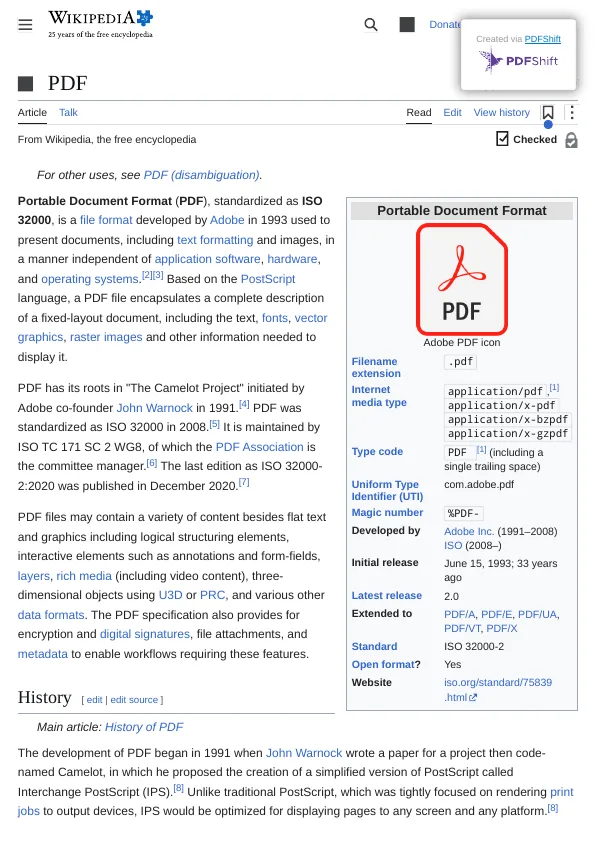
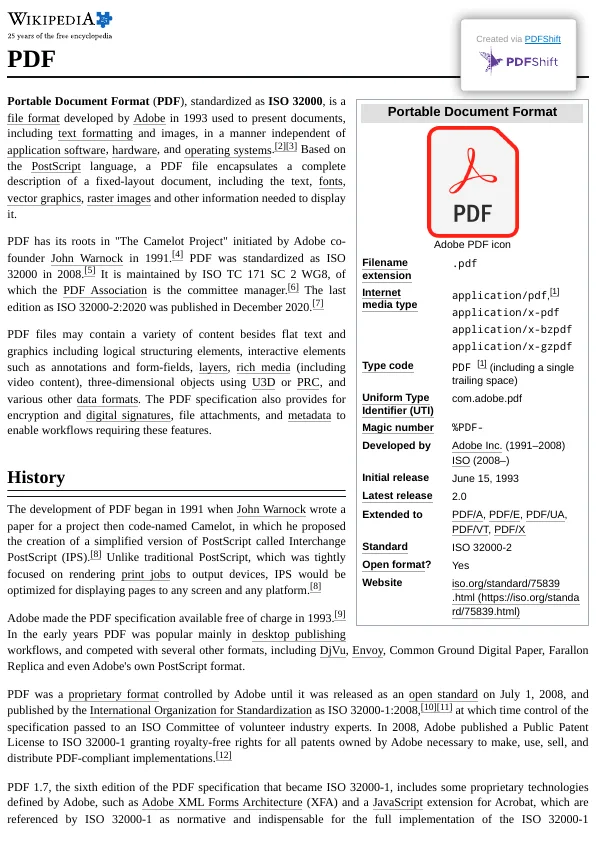
Load lazy images changed nothing on this one: same 22 pages as the defaults.
How the converter works
Your browser sends the address and your settings straight to the PDFShift API, the same endpoint your code would call, just without a key. Our Chromium loads the page, prints it at your page size and returns the PDF in the response. We don't keep a copy.
Without a key, PDFShift treats the request as a free account: the PDF carries the "Created via PDFShift" badge, files over 2 MB can't be made, conversions time out after 30 seconds, and you get up to 10 conversions a day. Addresses on your own network, like localhost, are refused.
The same PDF from your code
Here's what the API call tab gives you for the Wikipedia example with Print stylesheet ticked:
curl https://api.pdfshift.io/v3/convert/pdf \
  -H "X-API-Key: YOUR_API_KEY" \
  -H "Content-Type: application/json" \
  -d '{"source":"https://en.wikipedia.org/wiki/PDF","use_print":true}' \
  -o page.pdf
Swap in your key and that's your integration. Every parameter is in the API reference. The free plan gives you 50 credits a month with no credit card: create an account to get your key.
Frequently asked questions
How do I get a PDF of an entire webpage?
Convert it here. PDFShift prints the whole page, top to bottom, across as many PDF pages as it takes: 22 for Wikipedia's article on PDF. If images further down come out blank, tick Load lazy images.
How do I turn a URL link into a PDF from my code?
Send the address as the source of one POST to api.pdfshift.io/v3/convert/pdf, with your API key in the X-API-Key header, and the PDF comes back in the response. Our guides show the call in Python, Node, PHP and other languages.
Can I convert a page that needs a login?
Yes, from your own code. The API can send cookies, HTTP headers or a basic auth username and password with the request that loads the page, and our guide on loading pages behind a login shows how. The converter here sends none of them.